
Hyundai Ioniq (AE): Blower / Blower Unit. Components and components location
Hyundai Ioniq (AE) 2017-2022 Service & Repair Manual / Heating, Ventilation and Air Conditioning / Blower / Blower Unit. Components and components location
| Component Location |
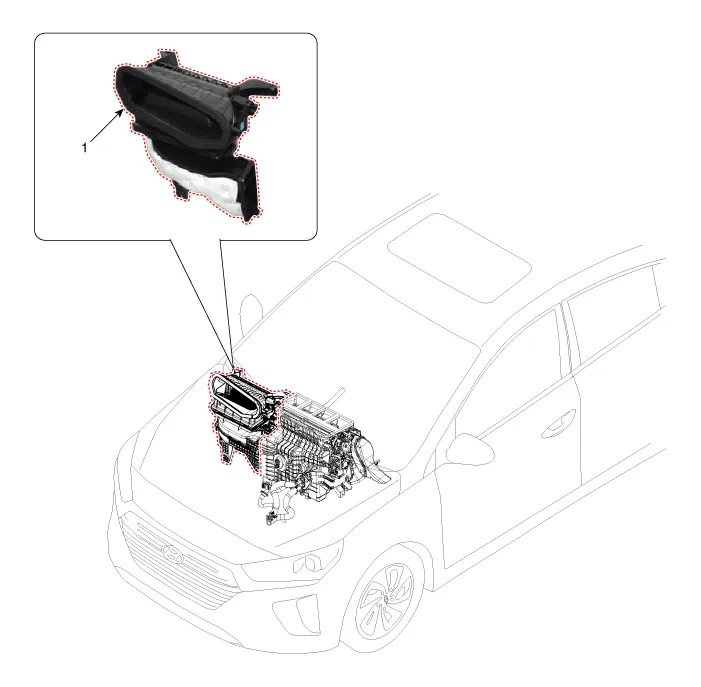
| 1. Blower unit assembly |
| Components |
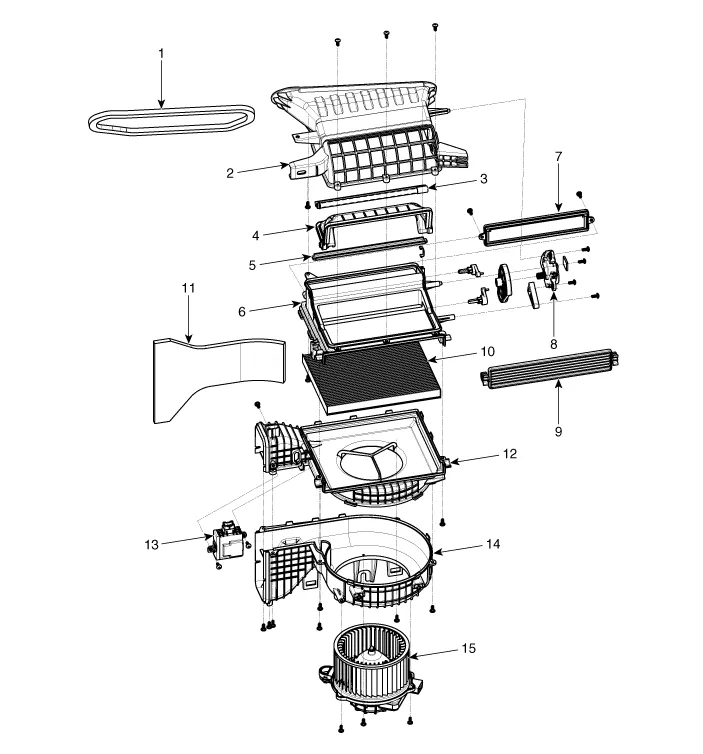
| 1. Duct Seal 2. Intake duct case 3. Air intake door assembly 4. Intake door 5. Seal 6. Intake duct case (A) 7. Air filter cover (A) 8. Intake actuator | 9. Air filter cover 10. Air filter 11. Blower unit pad 12. Blower upper case 13. Cluster ionizer 14. Blower lower case 15. Blower motor |
Replacement When prying with a flat-tip screwdriver or use a prying trim tool, wrap it with protective tape, and apply protective tape around the related parts, to prevent damage.
Other information:
Hyundai Ioniq (AE) 2017-2022 Service & Repair Manual: Intake Actuator. Components and components location
C
Hyundai Ioniq (AE) 2017-2022 Service & Repair Manual: Description and operation
System OverviewParking Distance Warning (PDW) is an electronic driving aid that warns the driver to be cautious while parking or driving at low speed. The sensor uses ultrasonic waves to detect objects within proximity of the vehicle.PDW consists of four RPS sensors which are detecting the obstacles and transmit the result separated into three war
Categories
- Manuals Home
- Hyundai Ioniq Owners Manual
- Hyundai Ioniq Service Manual
- Brake System
- Suspension System
- DCT(Dual Clutch Transmission) System
- New on site
- Most important about car

Copyright В© 2026 www.hioniqae.com - 0.013