
Hyundai Ioniq (AE): Manual Heating and Air Conditioning / Fan speed control
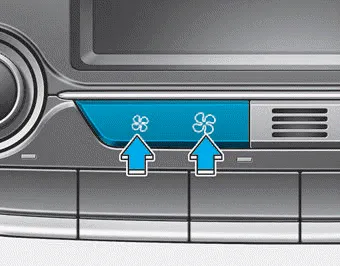
The fan speed can be set as desired by pushing the fan speed control button.
More air is delivered with higher fan speeds.
Pressing the OFF button turns off the fan.
Information
For better voice recognition, fan speed may automatically slow down for a couple of minutes when you activate voice recognition or hands free.
NOTICE
Operating the fan when the Engine Start/Stop button is in the ON position
could cause the battery to discharge. Operate the fan when the vehicle is in the
ready ( ) mode.
This button is used to select the outside (fresh) air position or recirculated air position. Recirculated air position With the recirculated air position selected, air from the passenger compartment will be drawn through the heating system and heated or cooled according to the function selected.
Driver only If you press the DRIVER ONLY button() and the indicator light illuminates, air mostly blows in the direction of the driver’s seat. However, some of the air may come out of other seating position ducts to keep indoor air pleasant.
Other information:
Hyundai Ioniq (AE) 2017-2022 Service & Repair Manual: Auto Defogging Sensor. Description and operation
DescriptionThe auto defogging sensor is installed on the front window glass. The sensor judges and sends signal if moisture occurs to blow out wind for defogging. The air conditioner control module receives signal from the sensor and restrains moisture and eliminate defog by controlling the intake actuator, A/C, auto defogging actuator, blower moto
Hyundai Ioniq (AE) 2017-2022 Service & Repair Manual: Specifications
S
Categories
- Manuals Home
- Hyundai Ioniq Owners Manual
- Hyundai Ioniq Service Manual
- If the 12 Volt Battery is Discharged (Hybrid Vehicle)
- Jump Starting
- Checking the Coolant Level
- New on site
- Most important about car
