
Hyundai Ioniq (AE): Trip Computer / Digital speedometer, Drive Info display
Digital speedometer
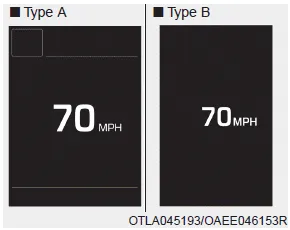
This message shows the speed of the vehicle.
Drive Info display
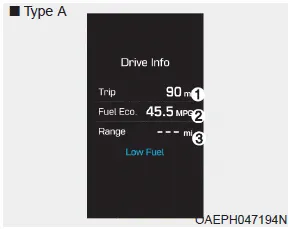
At the end of each driving cycle, the Driving Info message is displayed. This display shows the trip distance (1), the average fuel economy (2), and the remaining vehicle range (3).
This information is displayed for a few seconds when you turn off the ignition, and then goes off automatically. The information is calculated for each ignition cycle.
If the estimated remaining vehicle range is below 1 mi. (1 km), the distance to empty will display as "----" and a "Low Fuel" warning message (4) will be displayed.
Information
If sunroof open warning is displayed in the cluster, the Driving Info message will not be displayed.
Tripmeter (1) The tripmeter is the total driving distance since the last tripmeter reset. To reset the tripmeter, press the OK button on the steering wheel for more than 1 second when the tripmeter is displayed.
Driving style Energy flow The hybrid system informs the drivers its energy flow in various operating modes. While driving, the current energy flow is specified in 11 modes.
Other information:
Hyundai Ioniq (AE) 2017-2022 Service & Repair Manual: Description and operation
DescriptionRear corner radar is a system that uses two magnetic wave radar sensors attached on the rear panel to measure the distance from the following vehicles and provides the sensing and (visual and auditory) alarm of any vehicle coming into the blind spot.
Hyundai Ioniq (AE) 2017-2022 Service & Repair Manual: Repair procedures
Removal1.Disconnect the negative (-) battery terminal.2.Remove the tailgate lid trim.(Refer to Body - "TailGate Lid Trim")3.Disconnect the Rear view camera connector (A).4.Remove the Rear view camera assembly after loosening the mounting screws.Installation1.
Categories
- Manuals Home
- Hyundai Ioniq Owners Manual
- Hyundai Ioniq Service Manual
- DCT(Dual Clutch Transmission) System
- Suspension System
- Front Disc Brake. Repair procedures
- New on site
- Most important about car
