
Hyundai Ioniq (AE): Normal Charge / Checking Charging Status
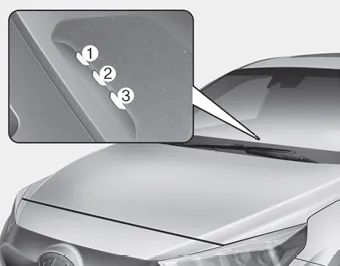
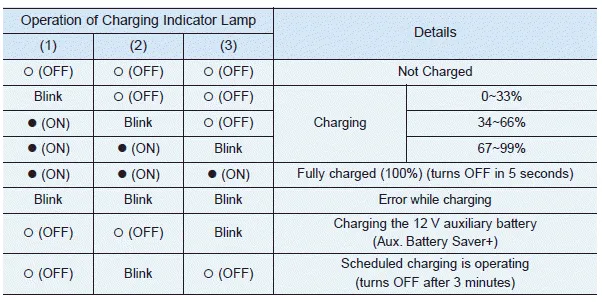
When charging the high voltage battery, the charge level can be checked from outside the vehicle.
1. Depress the brake pedal and apply the parking brake. 2. Turn OFF all switches, shift to P (Park), and turn OFF the vehicle. 3. Press center edge of the charging door to open the charging door.
â– Normal Charger 1. When charging is complete, remove the charging plug from the electrical outlet of the normal charging station. 2. Hold the charging connector handle and pull it while pressing the release button (1).
Other information:
Hyundai Ioniq (AE) 2017-2022 Service & Repair Manual: emperature Control Actuator. Repair procedures
Inspection1.Turn the ignition switch OFF.2.Disconnect the temperature control actuator connector.3.Verify that the temperature control actuator operates to the cool position when connecting 12V to terminal 3 and grounding terminal 7.Verify that the temperature control actuator operates to the warm position when connected in reverse.
Hyundai Ioniq (AE) 2017-2022 Service & Repair Manual: Description and operation
DescriptionRear corner radar is a system that uses two magnetic wave radar sensors attached on the rear panel to measure the distance from the following vehicles and provides the sensing and (visual and auditory) alarm of any vehicle coming into the blind spot.
Categories
- Manuals Home
- Hyundai Ioniq Owners Manual
- Hyundai Ioniq Service Manual
- Engine Control/Fuel System
- Hybrid Control System
- Engine Mechanical System
- New on site
- Most important about car
