
Hyundai Ioniq (AE): Normal Charge / How to Disconnect Normal Charger

â– Normal Charger
1. When charging is complete, remove the charging plug from the electrical outlet of the normal charging station.
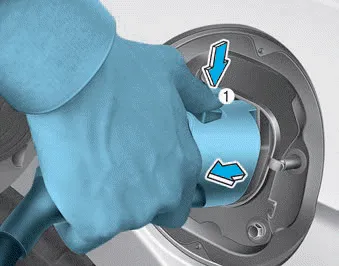
2. Hold the charging connector handle and pull it while pressing the release button (1).
Information
To prevent charging cable theft, the charging connector cannot be disconnected from the inlet when the doors are locked. Unlock all doors to disconnect the charging connector from the inlet.
However, if the vehicle is in the charging connectorAUTO mode, the charging connector automatically unlocks from the inlet when charging is completed.
For more details, refer to "Charging Connector AUTO/LOCK Mode" in this chapter.

3. Make sure to completely close the charging door.
When charging the high voltage battery, the charge level can be checked from outside the vehicle.
If the charging connector does not disconnect due to battery discharge and failure of the electric wires, open the hood and slightly pull the emergency cable.
Other information:
Hyundai Ioniq (AE) 2017-2022 Service & Repair Manual: In-car Sensor. Description and operation
DescriptionThe In-car air temperature sensor is built in the heater & A/C control unit.The sensor contains a thermistor which measures the temperature of the inside. The signal decided by the resistance value which changes in accordance with perceived inside temperature, is delivered to heater control unit and according to this signal the contr
Hyundai Ioniq (AE) 2017-2022 Service & Repair Manual: Auto Defoging Actuator. Description and operation
DescriptionThe auto defogging sensor is installed on front window glass. The sensor judges and sends signal if moisture occurs to blow out wind for defogging. The air conditioner control module receives a signal from the sensor and restrains moisture and eliminates defog by the intake actuator, A/C, auto defogging actuator, blower motor rpm and mod
Categories
- Manuals Home
- Hyundai Ioniq Owners Manual
- Hyundai Ioniq Service Manual
- Troubleshooting
- Transmission Gear Oil. Repair procedures
- Hybrid Vehicle Engine Compartment
- New on site
- Most important about car
