
Hyundai Ioniq (AE): Parking Distance Warning (PDW) / Parking Distance Warning (PDW) ON/OFF Switch. Components and components location
Hyundai Ioniq (AE) 2017-2022 Service & Repair Manual / Advanced Driver Assistance System (ADAS) / Parking Distance Warning (PDW) / Parking Distance Warning (PDW) ON/OFF Switch. Components and components location
| Component |
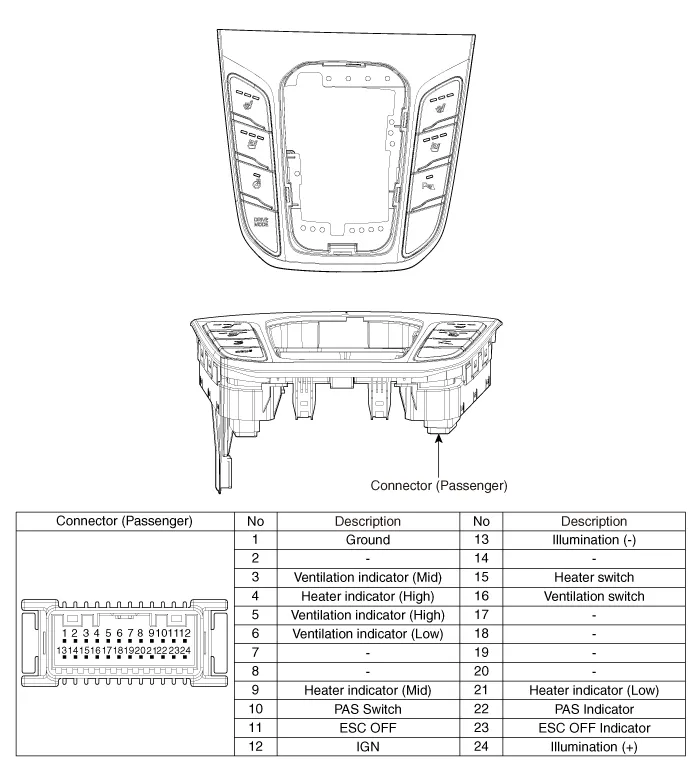
Removal1.Disconnect the negative (-) battery terminal.2.Remove the front / rear bumper cover.(Refer to Body - "Front Bumper Cover")(Refer to Body - "Rear Bumper Cover")3.
Categories
- Manuals Home
- Hyundai Ioniq Owners Manual
- Hyundai Ioniq Service Manual
- DCT(Dual Clutch Transmission) System
- Engine Mechanical System
- Jump starting procedure
- New on site
- Most important about car

Copyright В© 2026 www.hioniqae.com - 0.0199